Release Notes
Check out what's new in Reflect!
Release 2026.08.26
Compliance/ Trust & Security
Reflect has achieved SOC 2 Type 1 certification. The certification confirms that Reflect's security controls are suitably designed in accordance with the AICPA Trust Services Criteria. The SOC 2 Type 1 report is available to customers and prospects upon request under NDA. SOC 2 Type 2 certification, which evaluates the operating effectiveness of controls over time, is currently in progress.
Release 2026.07.23
New Feature
New API endpoints to create tests and segments — Two new endpoints (POST /v1/segments & POST /v1/tests) and two new MCP tools (create_test and create_segment) are available to create tests and segments for web, API, and native mobile tests. AI Agents like Claude can build or import existing tests built on open source frameworks (Selenium, Cypress, Playwright) or in other SmartBear products (TestComplete, BearQ) using the corresponding MCP tools to create equivalent Reflect tests.
Tunnel Update — Device names must now contain only Latin-1 characters
Release 2026.07.07
New Feature
Insert the Same Segment More Than Once in a Test
Multiple segment instances — Insert any segment into a test as many times as needed. Each occurrence runs independently at its position in the test.
Update Parameter Values step — A new step type that lets you change one or more parameter values at any point during a test. When you insert a duplicate segment with parameter overrides, an "Update Parameter Values" step is automatically added before that segment to set the correct values. You can also insert this step manually anywhere in the test.
Instance-level parameter overrides — Each instance of a segment can use different parameter values. Overrides are specified when inserting the segment or by editing the auto-generated "Update Parameter Values" step.
Synchronized step edits — Changes made to steps inside a segment - such as adding, removing, or reordering, - apply to all instances of that segment across all tests. If one instance has unsaved step changes, other instances are locked until those changes are saved or discarded, preventing conflicting edits.
Known limitations:
Test Run Modal / Suites: Parameter value overrides are only exposed for the first instance of each segment when running a test or configuring a data-driven suite. To use different values for a 2nd or later instance, create a dedicated parameter (e.g., `adminEmail`) and assign it via an "Update Parameter Values" step.
Advanced Options (Create Test modal): The starting-segment selector supports only one instance of each segment as a starting point. You can add additional instances during recording.
Release 2026.06.29
New Feature
Support for Automatically Follow Redirects for API steps
Call API steps now have a new optional setting to configure following redirects. When this setting is enabled, the API call will follow redirects rather than return the response to the initial API request. When the setting is disabled, Reflect will continue to return the response to the initial API request (such as 301 Moved Permanently or a 302 Found). This setting is available for API steps across all test types (Web tests, Mobile tests, and API tests).
A new version of the Tunnel has been released. This release updates the Tunnel to support the new Automatically Follow Redirects setting for API steps associated with test runs that are using the Reflect Tunnel.
Release 2026.06.08
New Feature
Network Log Restrictions
Admins can now configure a list of hostnames to exclude from captured network logs. When a test runs, any network requests made to a restricted hostname are filtered out before the network logs are saved. The setting lives in the new 'Network Log Restrictions' section on the Account Information page in Settings.
Test runs capture network traffic by default, which can include requests to systems you'd rather not store in test artifacts (e.g. SSO Providers), production APIs, or other sensitive third parties. Previously there was no way to exclude these requests from the captured logs. Network Log Restrictions gives Admins account-level control over what gets saved, so your network logs contain only the traffic you actually want to review.

Key Capabilities
Configure a list of restricted hostnames at the account level
Restricted hostnames are filtered out of captured network logs before saving
Admin-only setting on the Account Information page in Settings
Applies to all test runs in the account
Mobile Testing
"Max number of retry steps" setting removed - AI prompt steps no longer use a fixed "max number of retry steps" setting. The AI now iterates continuously, evaluating the current app state against the expected result and retaking actions as needed until the step timeout. For multi-swipe scenarios, a step timeout of 20–30 seconds is recommended to give the AI enough time to evaluate and act.
Test Recording/ Expected Results generation timing change - Expected results for recorded AI prompt steps are now generated after the user performs their next action during a recording session instead of immediately after the current action. This anchors the expected result to a more accurate application state. Users can still manually edit the expected result field to refine success conditions for any step.
Recording Swipe Actions - Swipe actions recorded during test creation are now transcribed with the correct direction. Previously, click-and-drag gestures on the device screen were often recorded in the opposite direction. A drag from bottom to top is now correctly recorded as "swipe up," which is the equivalent of a scroll-down action on the web, bringing hidden content below the viewport into view. When entering swipe steps manually, use directional phrasing (like "swipe up," "swipe down") to ensure correct execution. Additional improvements for horizontal swipes and swipes within elements such as carousels and list items are in progress.
Interaction with system toolbars - AI prompt steps targeting system toolbar controls ("tap on the home button"), such as the Android Home or Back buttons, are no longer supported. To interact with system-level controls, use the corresponding Appium commands (like"mobile: keyevent", {"keycode": 3}, "mobile:terminateApp", or "mobile:backgroundApp").
Release 2026.06.01
Enhancement
Reflect Tunnel Improvements
OAuth2 token generation is now supported via Tunnel. Authentication Profiles using OAuth2 can now request tokens from providers that are only reachable through a Tunnel connection.
Error messaging for Tunnel-connected sessions has been improved. When a connection fails, Reflect now displays a clear explanation of the issue along with actionable next steps to resolve it.
Release 2026.05.27
New Feature
Reflect In-App Agent
Reflect now supports agentic test creation and editing via an in-app agent.
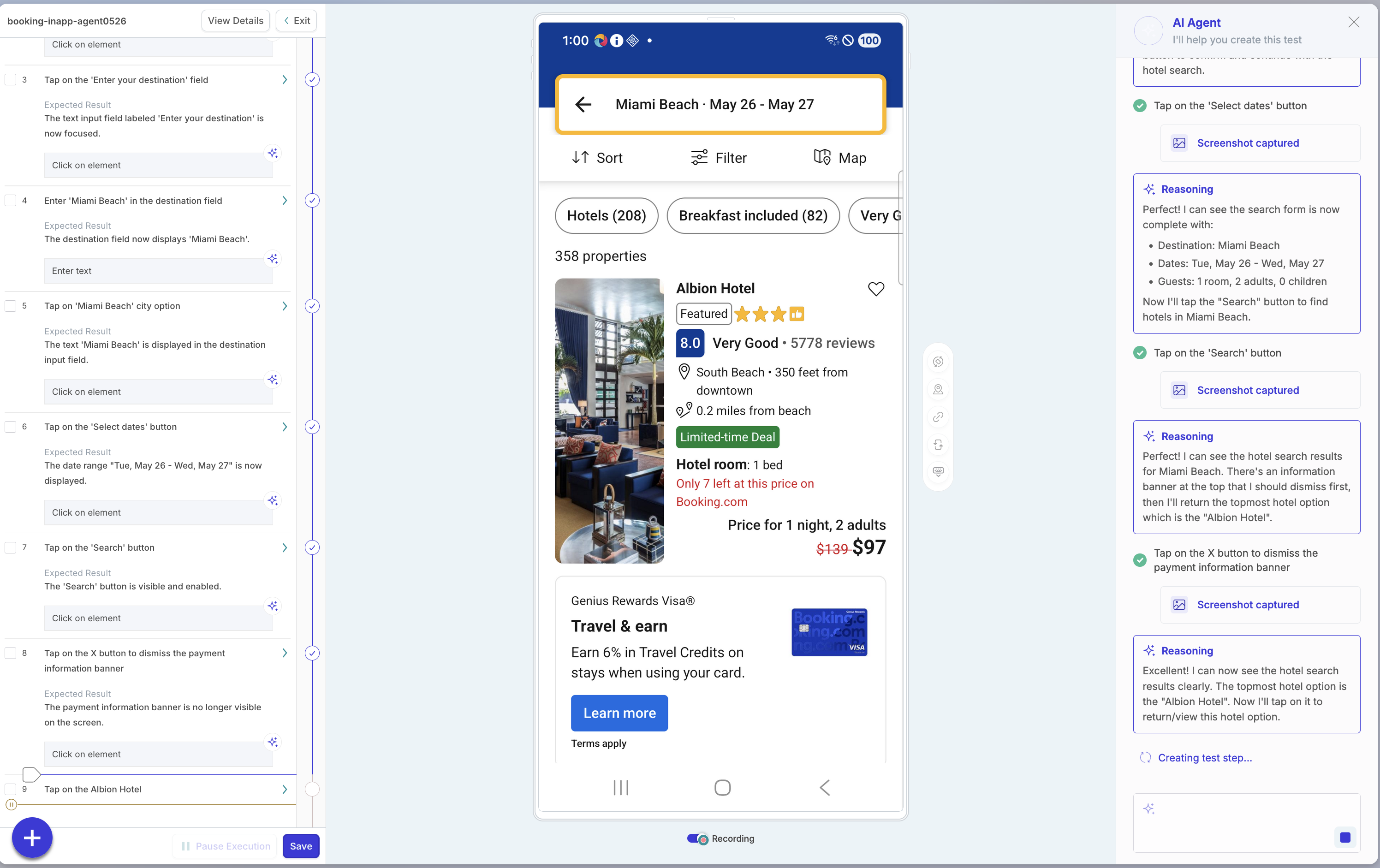
When you add a prompt step during a web or mobile recording session, the step can evaluate to multiple discrete actions or a high-level task. For example, "Click the Login link and verify there are no errors on the page" or "Register as a new user." In either case, a new Agent sidebar opens and the Agent assists in completing the task. The Agent supports the same capabilities available in the MCP tools, including adding steps, deleting steps, adding segments, and inspecting the current state of the application.
As part of this release, we have also updated our Zephyr integration so that when you run a test from Zephyr for the first time, it enlists this new agent to help convert the manual test into an automated test. This new workflow will help Zephyr users convert manual test cases more quickly into fully automated tests.
This new capability is available to all Reflect customers regardless of plan, and is supported for both Web and Mobile tests. Agent use consumes no credits.
Vision AI for Web Testing
Vision AI now powers prompt steps and self-healing for web tests, bringing the same visual understanding capabilities previously available only for mobile tests to the web platform.
Prompt steps can now target elements by appearance or position on the page, perform visual validations, and answer open-ended questions about page state — for example, "Click the orange Login button" or "Verify that the error banner is visible." Self-healing has also been updated to use Vision AI to locate elements during record-and-play steps, improving recovery accuracy when the UI changes.
Wait step now available
You can now add a dedicated 'Wait' step to your tests in Reflect. The Wait step pauses test execution for a set number of seconds before continuing to the next step. It's available across Web, Mobile, and API tests.
You can add a Wait step in two ways:
From a test definition, click between any two steps and add it.
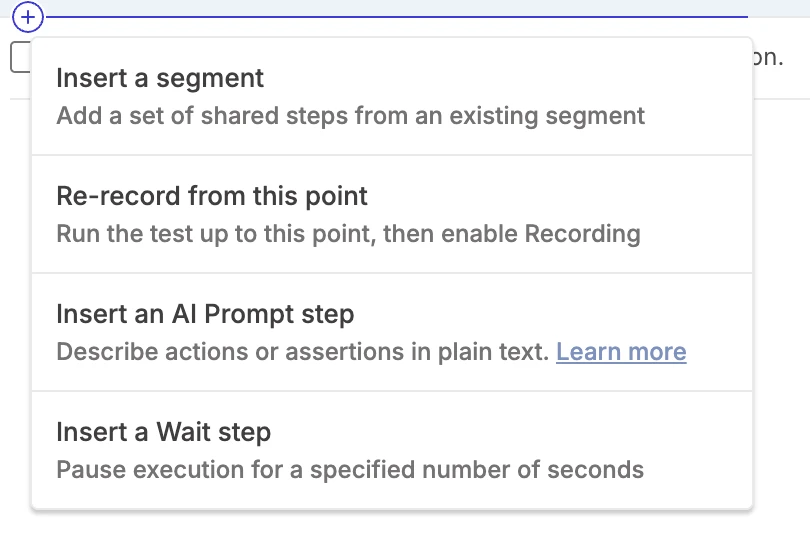
While creating or editing a test, choose the Add a Wait Step option.
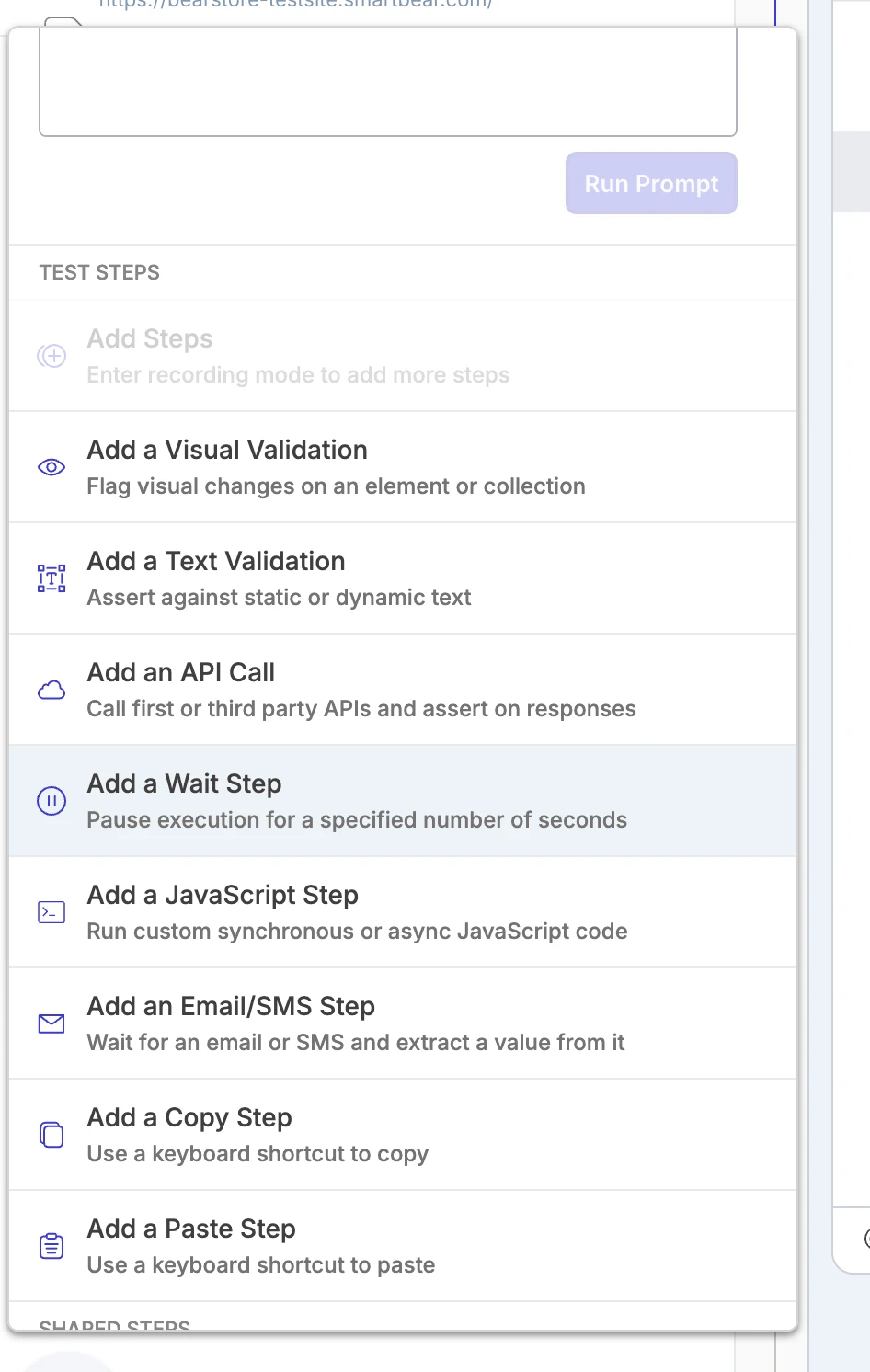
Previously, adding a pause to your test required using an 'Execute JavaScript' step with a custom snippet. The Wait step makes this a first-class action in Reflect, so timing-sensitive scenarios like waiting for animations, async processes, or downstream systems are now simple, explicit, and easy to maintain.
Key capabilities
Add a Wait step between any two steps in a test definition
Configure the pause duration in seconds
Supported across Web, Mobile, and API tests
Release 2026.05.15
New Feature
Test and segment export
You can now export the full step-by-step definition of a test or segment from Reflect. Exports are available directly from the test and segment pages, or through the Public API endpoints. Open the menu in the top-right corner of a test or segment and select Export.
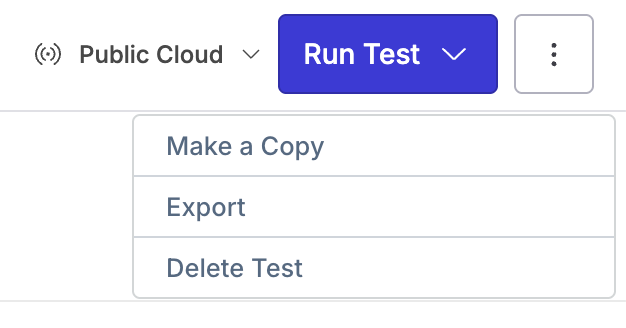
This enhancement gives teams more flexibility and control over their Reflect test assets. You can use exported test and segment definitions to review automation logic outside of Reflect, share test details with others, keep external records, or support custom workflows using the Public API.
Key capabilities
Export full test definitions from the test page
Export full segment definitions from the segment page
Retrieve segment definitions programmatically using the Public API
Retrieve full test details programmatically using the Public API, including referenced segments
Public API updates
The following Public API endpoints are now available:
GET /api/segments- returns the segments in your account, including a step-by-step breakdown of each segment’s definition.GET /api/tests/{id}- returns the full step-by-step definition of a single test, including any segments it references.
Mobile Testing
AI prompt steps now support Doubletap & Longpress in mobile testing. Users can add these steps in using the AI prompt steps. Users can format these commands like:
“longpress on button_A”“doubletap on button_B”
Recording these new actions (longpress/doubletap) is NOT supported (they will likely get recorded as clicks/scrolls, so make sure to type these commands out manually if you need to use either the longpress or doubletap actions in your mobile tests.
Release 2026.04.22
New Feature
Tunnel v0129 available
The Tunnel v0129 improves throughput and stability when running in parallel at high levels. Teams using it for higher-volume execution can see more reliable performance under load, fewer latency spikes, and fewer write-related failures during heavy usage.
This enhancement reduces internal processing overhead to improve throughput, fixes latency spikes observed under high parallel execution, fixes write errors that can occur under load, and improves stability for higher levels of parallel test execution.
Release 2026.04.13
New Features
Mobile testing
Agentic loop is now supported for AI prompt steps with defined expected results. During test playback, when an action does not achieve the expected outcome, Reflect Reflect automatically performs additional corrective actions and re-evaluate the application state after each step.
This process repeats until the expected result is satisfied or the configured maximum number of (agentic retry) steps is reached. This enhancement improves reliability in scenarios such as repeated scrolling (aka “swipe until” scenarios) to locate elements and handling unexpected pop-ups that block target elements.
The below video shows an AI prompt step “Swipe left to view the next brewing tip” with the expected results “The text ‘Don’t skimp on cleaning your gear' is visible”. During playback, Reflect evaluates the screen state and swipes 3 consecutive times until the desired ‘brewing tip’ card is visible.
Integrations
Reflect now integrates with SAP Cloud ALM. This integration enables users to create and run automated Reflect Tests from within SAP Cloud ALM.
Release 2026.04.06
New Features
Mobile testing
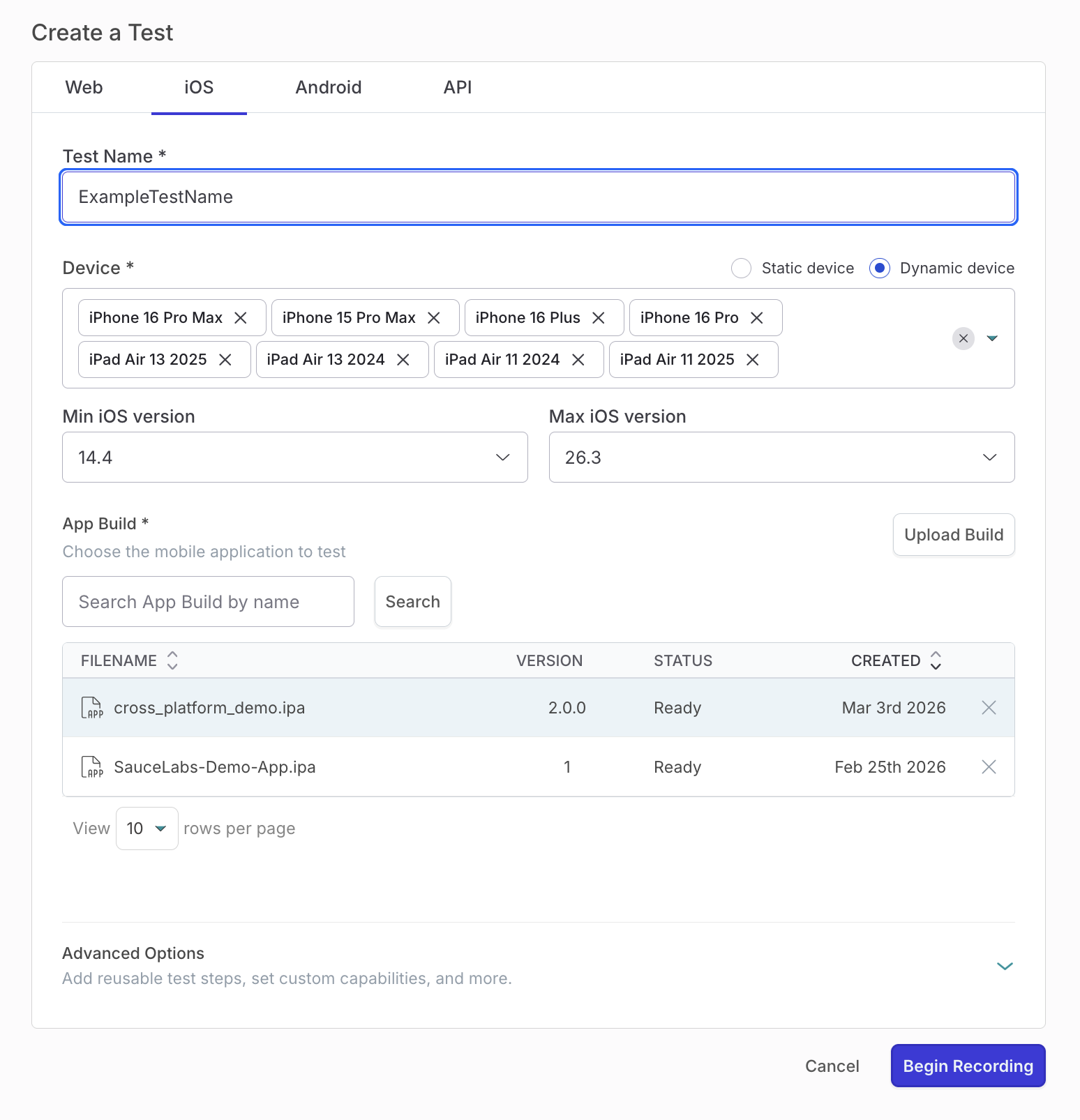
Dynamic device allocation is now supported when creating, editing, and running mobile tests. Users can select multiple device models and define a minimum and maximum OS version range. At runtime, Reflect connects to any available device that matches the selected criteria, reducing failures caused by device unavailability.
MCP integration
Reflect now supports agentic test creation via the SmartBear MCP Server. Users can pair Reflect with external agents (for example, Claude, Codex, or Cursor) to generate tests through real-time interaction with an application.
New MCP tools are available to support this workflow:
connect_to_session– Connect to an active Reflect test sessionget_screenshot– Capture the current application stateadd_prompt_step– Add test steps using natural language instructionsadd_segment– Insert reusable test segmentsdelete_previous_step– Remove the most recently added steplist_segments– Retrieve available reusable segments
Additional improvements include enhanced guidance for agents when constructing tests and support for a
/reflect-sap-testprompt for SAP-specific test creation.Tunnel Enhancements
Reflect Tunnel includes built-in support for upstream proxies and Proxy Auto-Configuration (PAC) files. If your network requires a proxy to access external or internal resources, Reflect Tunnel will automatically route its traffic through the configured proxy.
Note
These settings apply to Reflect traffic used to initialize the tunnel as well as traffic from Reflect tests that use the tunnel.
Release 2026.03.13
Reflect Mobile
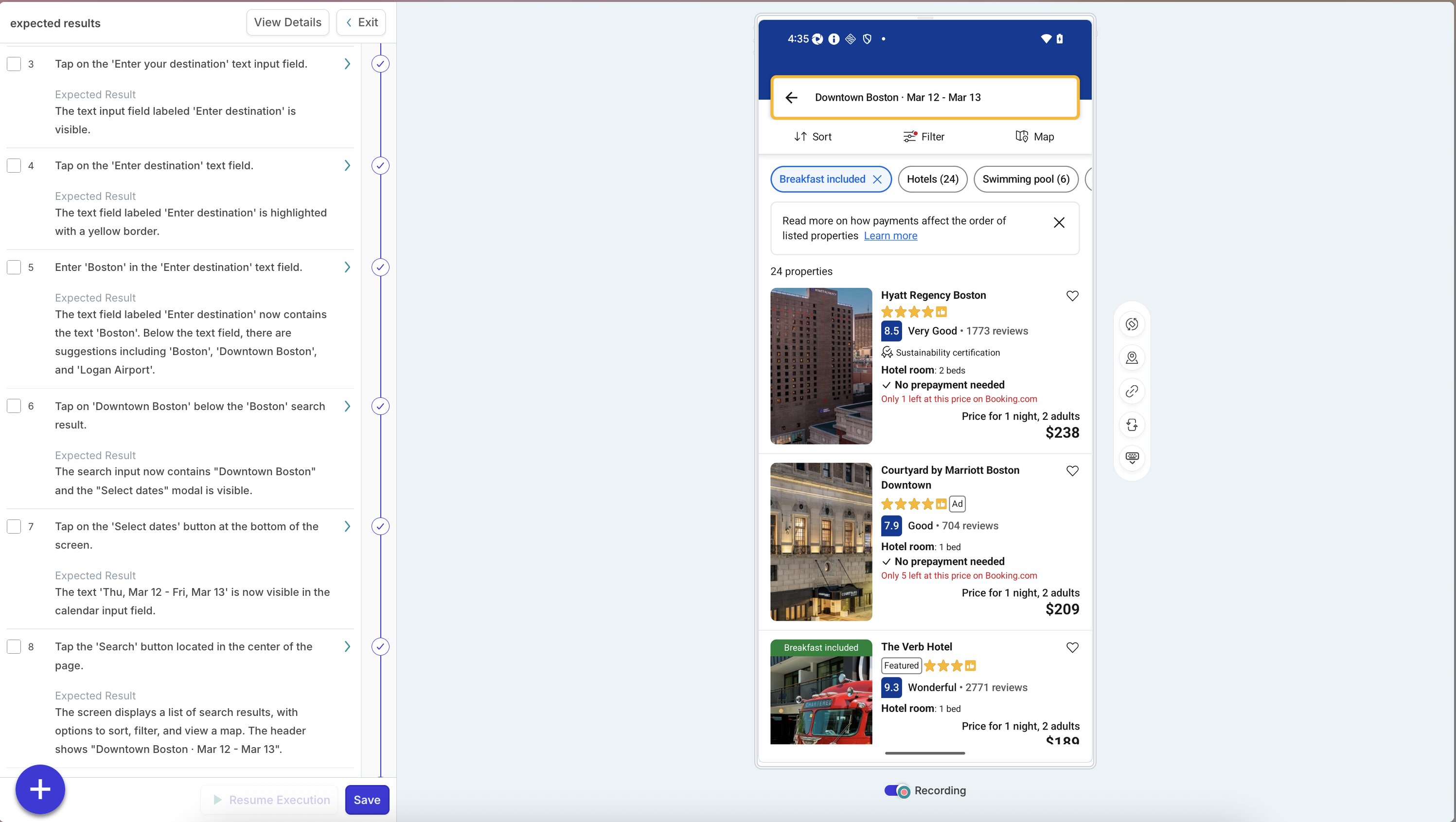
AI-based step verification. During recording, Reflect automatically generates an Expected Result for each AI prompt step that describes the screen state or outcome after the action. During execution, Reflect verifies that each action meets this success condition.
To see this in action, record a new test and observe how the Expected Result field is automatically populated alongside the AI prompt step description.
Auto-Generated Expected Results. Reflect populates expected results automatically for every AI prompt step during recording.
Step-Level Verification. Each AI prompt step is validated during execution to confirm a successful outcome.
Customizable Assertions. Users can edit “Expected Results” field to refine logic, add parameters, or reuse variables.
Reduced False Positives. Verification helps ensure AI steps only pass when the intended result is achieved.
Improved Keypress Input Stability in Mobile Testing. We enhanced Reflect’s keypress input behavior during test execution to make text entry more reliable and deterministic across mobile apps, especially when cursor placement is inconsistent. This update ensures that the intended user input is entered cleanly, without leaving behind unexpected characters. After clicking into an input field, Reflect now:
Moves the cursor to the rightmost end of the active field
Clears all existing text values
Sends the user-defined keypress input from the test step
Dismisses the on-screen keyboard (you can turn this off using the auto-hide-keyboard toggle)
General
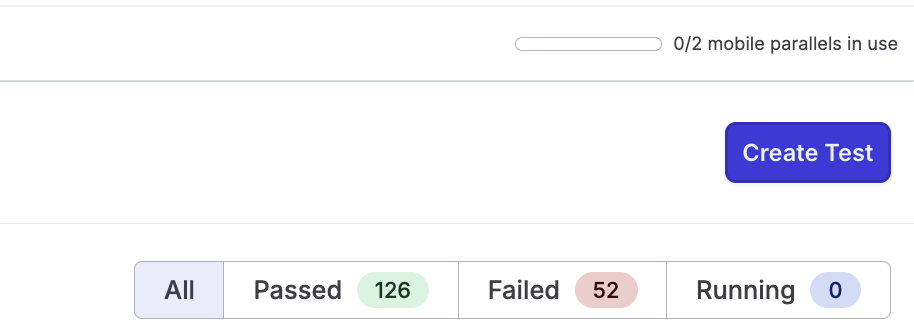
Web Mobile Parallelism Counters. With the release of native mobile app support, Reflect now manages separate parallelism limits for Web and Mobile testing, giving teams clearer visibility and better control over their execution capacity, especially when physical devices are involved.
The counters are displayed in the top-right corner when viewing the Web or Mobile tabs in the Test Repository.
When all mobile parallels are in use, users are blocked from launching additional mobile test creation sessions.
Clear, visible messaging explains when all mobile parallels are occupied and why the session cannot be started. This ensures mobile test creation remains predictable and avoids contention for limited physical device resources.
Release 2026.03.09
QMetry Integration is now available in Reflect. You can now manage manual and automated testing in a single workflow.
Key Capabilities
Connect QMetry to Reflect and configure default synchronization settings.
Automatically synchronize Reflect tests to QMetry as test cases.
Create a new version in QMetry when updates are made in Reflect to a synchronized test case.
Synchronize Reflect suites to QMetry as test suites.
Push execution results from Reflect to QMetry.
Map existing Reflect tests to QMetry test cases.
These enhancements reduce manual work and improve visibility for teams using both Reflect and QMetry. Teams can keep tests and execution results synchronized in QMetry while continuing to create and run automated tests in Reflect.
Improved Email Notification Recipient Management in Test Suites.
Managing who receives email notifications from your test suites just got easier. When configuring the Send Email action in a suite, you can now:
Search for users by name. No more scrolling through long lists to find the right person.
or recipients with a single click.
Browse a recipient list that is sorted alphabetically for faster navigation.
These improvements give you precise and fast control over who receives notifications when a suite run completes or fails.
Release 2025.12.09
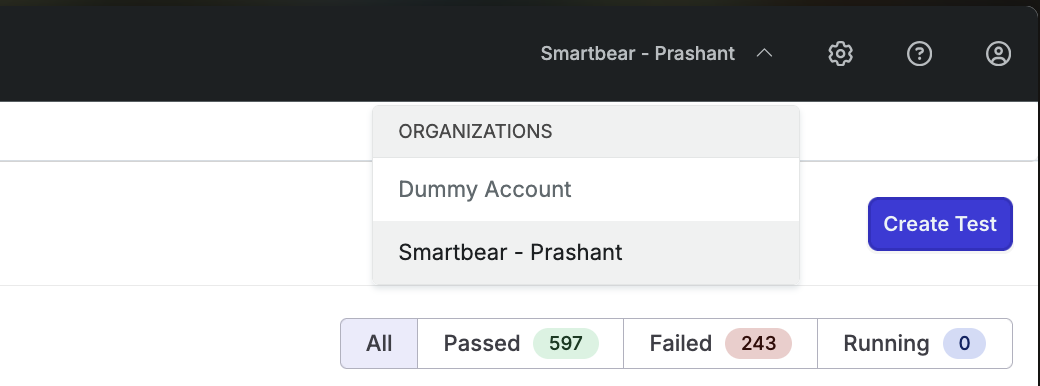
Introducing support for multi-account context switching in Reflect. We’ve just shipped support for Multi-Account Context, a major enhancement that lets users seamlessly switch between multiple Reflect accounts -without repeated logins or manual context changes.
Why This Matters
Work across organizations without friction. Users can now belong to multiple customer accounts, and can easily move between them instantly without multiple repeated authentication.
Eliminate login fatigue. No more logging out and back in or using incognito windows just to access a different Reflect account.
Faster collaboration. Teams, contractors, and services organizations can support multiple tenants more easily and accurately.
Key Capabilities
Unified login. A single user identity can now belong to multiple accounts.
One-click context switching. Quickly switch between accounts using the dropdown next to the organization name in the navigation bar.
Trigger mobile test suite from CI/CD using a specific uploaded app build. Use the Suite Execution API with
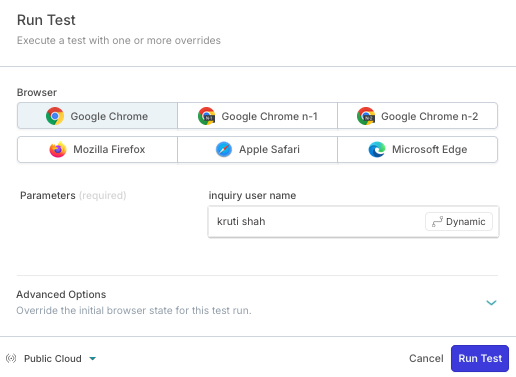
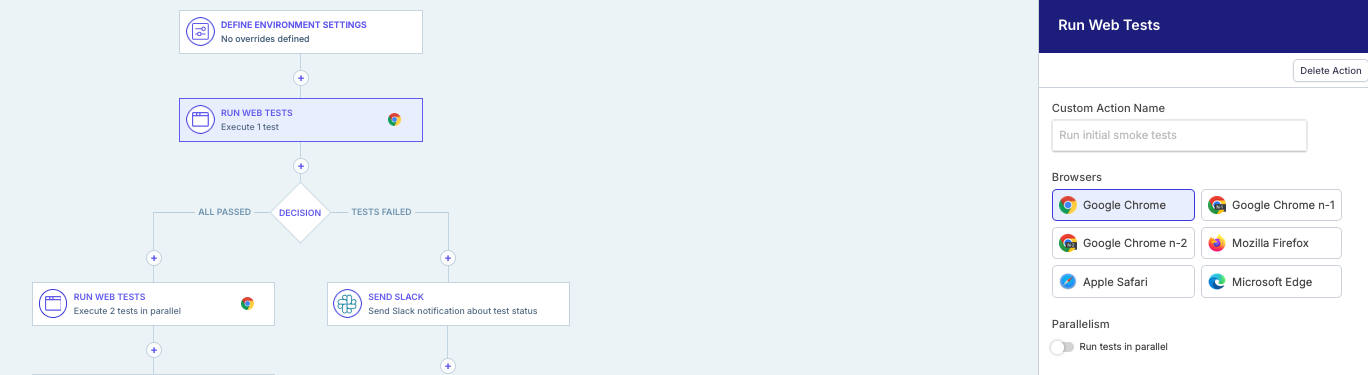
mobileAppOverridesto run tests against a newly uploaded.apkor.ipawithout updating settings in the Reflect web app. This makes it easier to run full regression tests automatically after each mobile build in your pipeline. Learn more: Working with CI/CD.Introducing Chrome n-1 and n-2 Browser Selection in Reflect. We now support for Chrome n-1 and n-2 in Reflect Web Tests. You can run your tests against the two most recent Chrome versions behind the latest release. This makes it easier to expand test coverage and validate real-world browser usage trends.
Why This Matters
Improved Coverage. Many teams see more end-user traffic on Chrome n-1 and n-2 than on Firefox or Safari.
Confidence in Compatibility. Catch regressions that only appear in slightly older browser builds.
Flexibility in Execution. Run single test cases or full suites against the exact versions you care about.
Key Capabilities
New Browser Options. Select Chrome n-1 and Chrome n-2 directly from test settings.
Suite-Level Configurations. Apply browser selections across all tests in a suite for consistent coverage.
Real-World Testing. Reflect’s environment automatically matches official Chrome release cycles.
Release 2025.09.30
Reflect Mobile:
AI Prompt Enhancements for "waits". You can now use prompts like “wait for [object/state] to be visible”, which behave like assertion prompts. Learn more on how to use "waits".
Delete App build files. Users can press the X button next to their app build files within the device picker modal in order to delete their app build files. This action is not reversible. Additionally, app build files are auto-deleted after 60 days. Users will notice that any files older than 60 days will automatically get removed and not be visible in the device picker modal.
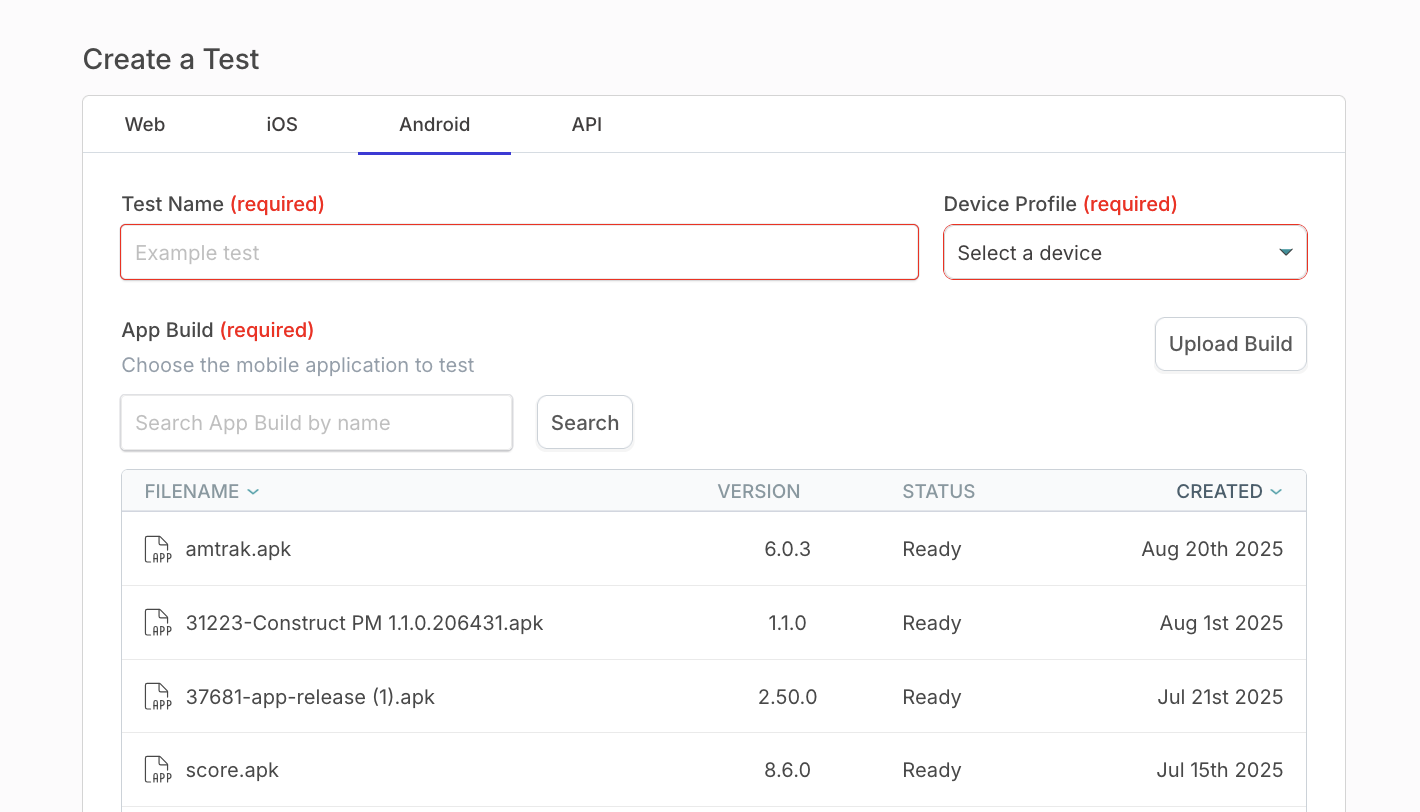
Updated the Device Picker modal for new Android and iOS tests. Mandatory fields (test name, device profile, and app build file) are now highlighted until completed. Once filled, the highlights disappear and you can connect to a mobile device to start a test recording session.
Added an Optional Hide Keyboard setting. By default, AI prompt keypresses close the on-screen keyboard after sending text, which can disrupt tests in webviews or hybrid apps. You can now turn off the Hide keyboard toggle (bottom left during test creation) to keep the keyboard open. This setting can also be toggled later in the test step description.

Release 2025.08.15
Improvements:
We now run your API tests directly in the browser instead of starting virtual machines in the cloud. This makes your API tests run faster and gives you real-time feedback as you run your Scenarios.
The Test Suites UI now includes two new buttons:
Import CSV button lets you upload a CSV to configure your suite. This works the same way as the Reflect API, but is now available in the UI. You can manage test data outside Reflect and then either run your tests through the API or upload your CSV in the UI before running the suite.
Export CSV button lets you download your suite configuration as a CSV. You can customize this file if you prefer to manage test data outside Reflect instead of in the Reflect UI.

Release 2025.07.31
New Features:
Reflect now automatically includes default request headers for all API requests to help users run successful calls with less setup. You can enable default headers in Settings → Account Information, so you don’t need to manually add them to each test step. Check the Default Headers article to learn more.
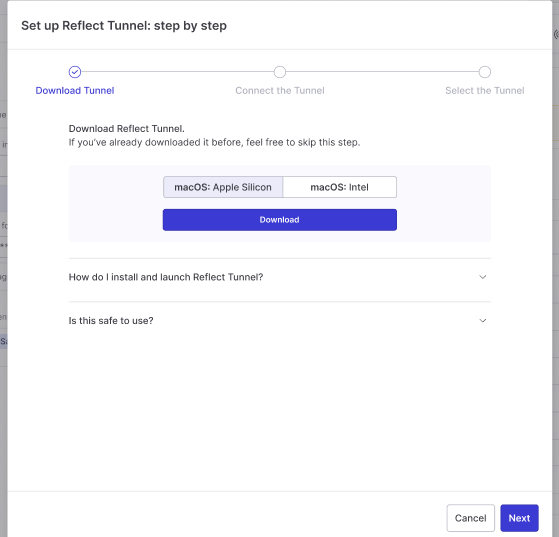
It’s now easier to download and run the SmartBear tunnel when creating API tests. If you need access to private environments, just follow the steps in the pop-up modal to quickly install and start the tunnel:
Release 2025.06.16
New Features:
API testing. Users can now create standalone API tests in Reflect.
Mobile testing. Users can now create tests against native mobile applications for both IOS and Android. Check the article on Native Mobile Testing to learn more.
Switch to credit based system. We introduced changes to our license consumption model to support various different application test types.
Release 2025.04.18
Improvements:
Slack channel search. We added a search bar to the channel drop-down in Suites to help you quickly find the right channel.
User panel search. We added a search bar to the user management panel to help you find users faster.
Release 2025.03.22
Improvements:
"Run Test and Watch Live" button. It works now faster by improving redirect speed and user experience. We also added a loading spinner to the submit button and kept the modal open until the redirect completes.
'Prettify' option for Request bodies in API test steps. It automatically formats JSON and XML for better readability. We also updated the request body field to always display at least three lines instead of one.
Bug fixes:
Various other bugfixes and improvements.
Release 2025.02.27
New Features:
Drag and drop reordering on the definition page. You can now reorder test steps by dragging and dropping them. Move single or multiple steps up or down, even in and out of segments.
Duplicating steps. Added a “Copy Step(s)” option to duplicate selected steps in test cases. Duplicated steps appear right after the last selected step. If the last selected step is inside a segment, the steps are duplicated after the segment. Segments cannot be duplicated.
Ability to copy and paste steps. We introduced Copy & Paste steps for easier test automation. Clicking on or creates a keypress step with Ctrl+C or Ctrl+V. The step is inserted into the test definition and runs automatically.
Typeahead for commonly used endpoints in CallAPI steps. The 'URL' field in the Call API test step now has autocomplete. You can quickly see and select recent URLs from your previous API test steps. This makes it easier to modify the URL without typing or copying it.
Improvements:
Progress indicator for AI prompt execution during the test creation phase. Users can now see stages like "Processing test step", "Analyzing UI elements", "Optimizing action flow" and "Executing AI step". This helps reduce frustration by showing that the system is working, especially when prompt execution takes a few seconds.
Session timeout. When a AI step fails due to a timeout in the step debugger, you can now easily extend the timeout. Choose to increase the timeout by 10, 20, or 30 seconds, up to a maximum of 120 seconds. Just pick your preferred value and click the Run Prompt button. This makes it simple to handle timeout errors in Native Mobile.
Formatting on the variables list page. Improved variable display on the account variables page. Long variable values (up to hundreds of kilobytes) are now fully visible and copyable when editing. For rendering, the values are shortened with ellipses.
Reliability and UX of syncing changes to a TCM tool. When you rename a test, you can now see a notification. It reminds you to click the “Sync Changes” button to update the test name in Zephyr.
Access controls for Zephyr integration users. Updated the app for Zephyr users to hide details about tests from Jira projects they cannot access. This ensures that users only see data for projects they have access to.
Bug Fixes:
Various bug fixes and improvements.